> ## Documentation Index
> Fetch the complete documentation index at: https://docs.dibby.ai/llms.txt
> Use this file to discover all available pages before exploring further.
# Data Types
> Understand dibby's data system and its advantages
## Overview
dibby uses a robust type system to ensure your data is handled correctly throughout your workflows. This means fewer errors, better validation, and workflows that work reliably every time.
## What are data types?
Data types define what kind of information you're working with. Instead of treating everything as text, dibby understands the difference between numbers, dates, documents, and more.
Think of it like organizing a filing cabinet: you wouldn't store invoices the same way you store contact lists. Data types help dibby organize and validate your information properly.
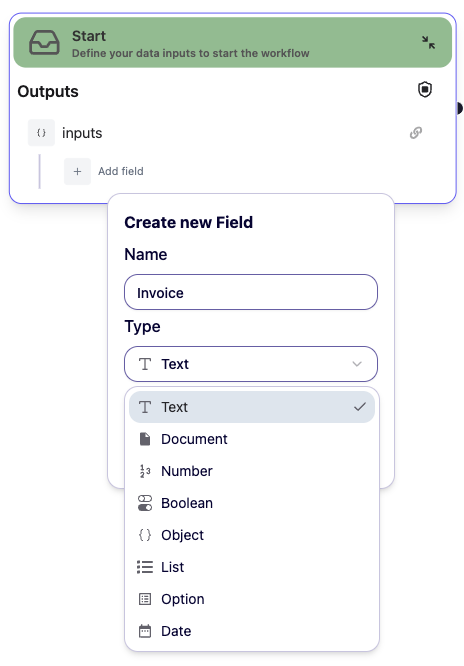
## Available data types
### Text (string)
Simple text information like names, addresses, or descriptions.
**Examples:**
* Customer names
* Email addresses
* Product descriptions
* Status messages
**Advantages:**
* Easy to read and understand
* Supports any characters
* Perfect for human-readable information
### Number
Numeric values for calculations and comparisons.
**Examples:**
* Invoice amounts
* Quantities
* Percentages
* Scores
**Advantages:**
* Enables calculations (add, subtract, multiply)
* Allows comparisons (greater than, less than)
* Prevents invalid text from being treated as numbers
### Date
Date and time information with proper formatting.
**Examples:**
* Invoice dates
* Delivery deadlines
* Timestamps
* Expiration dates
**Advantages:**
* Automatic format handling (no confusion between MM/DD/YYYY and DD/MM/YYYY)
* Date calculations (days until deadline, age of document)
* Proper sorting by date
* Time zone awareness
### Boolean (yes/no)
True or false values for decisions and flags.
**Examples:**
* Is approved?
* Has attachments?
* Needs review?
* Is urgent?
**Advantages:**
* Clear yes/no decisions
* Perfect for conditions and routing
* No ambiguity (unlike "yes", "Yes", "YES", "y", "true")
### Document
Files like PDFs, images, or scanned documents.
**Examples:**
* Invoice PDFs
* Contract documents
* Receipts
* Identification documents
* Scanned forms
**Advantages:**
* Direct processing by AI models
* Extract text and data automatically
* Handle multiple file formats
* Maintain document quality
### List (array)
A collection of items of the same type.
**Examples:**
* List of line items in an invoice
* Multiple email attachments
* List of customer names
* Collection of amounts
**Advantages:**
* Process multiple items together
* Use with For Each loops
* Keep related data organized
* Handle variable-length data
### Object
Complex data with multiple fields grouped together.
**Examples:**
* Customer information (name, email, phone, address)
* Invoice (number, date, amount, vendor)
* Address (street, city, state, zip)
**Advantages:**
* Keep related information together
* Clear data structure
* Easy to understand and maintain
* Reusable across workflows
### Option (enum)
A predefined list of allowed values.
**Examples:**
* Document types: "Invoice", "Receipt", "Contract"
* Status: "Pending", "Approved", "Rejected"
* Priority: "Low", "Medium", "High"
**Advantages:**
* Prevents typos and inconsistencies
* Clear set of options
* Easy to validate
* Perfect for categorization
## Why strong data types matter
### Catch errors early
With proper data types, dibby can catch mistakes before your workflow runs:
* ❌ **Without types:** "123" + "456" might give you "123456" (text joining).
* ✅ **With types:** 123 + 456 correctly gives you 579 (math)
### Better validation
Data types ensure you're working with the right information:
* Can't accidentally use text where you need a number
* Dates are always properly formatted
* Documents are valid files, not broken links
### Clearer workflows
When you see a field, you immediately know what kind of data it expects:
* `amount: Number` → clearly a numeric value
* `dueDate: Date` → obviously a date
* `status: Enum` → limited set of choices
### More reliable
Strong types mean:
* Fewer runtime errors
* Predictable behavior
* Easier to test
* Workflows that work consistently
### Optional fields
Mark fields as optional when they might not always have a value:
* `phone: String` (optional) → might be empty
* `notes: String` (optional) → not always provided
### AI extraction
When extracting data from documents, specify types:
* AI knows to extract dates as proper dates
* Numbers are recognized and formatted correctly
* Enums ensure consistent categorization
### Validation
Data types enable automatic validation:
* Check if required fields are present
* Verify data format is correct
* Ensure values are within valid ranges
## Best practices
### Choose the right type
Use the most specific type that fits your data:
* ✅ Use `Date` for dates, not `String`
* ✅ Use `Number` for amounts, not `String`
* ✅ Use `Boolean` for yes/no, not `String`
### Make optional what's optional
Marking as optional, allow you to have a better control over your workflow. If something is missing you will catch it directly.
## Type safety benefits
### For your business
* **Fewer errors** → Less time fixing mistakes
* **Better data quality** → More accurate results
* **Easier auditing** → Clear data trail
* **Compliance friendly** → Validated data structures
### For your team
* **Clearer workflows** → Easy to understand what data is expected
* **Faster development** → Less guesswork
* **Better collaboration** → Everyone speaks the same language
* **Easier onboarding** → New team members understand quickly
### For your automation
* **Reliable execution** → Workflows run consistently
* **Predictable results** → Same input = same output
* **Better AI performance** → AI knows what to extract
* **Easy debugging** → Clear error messages
## Next steps
Learn how to use data types in workflows
Store typed data in tables