
Overview
Configuration
Conditions
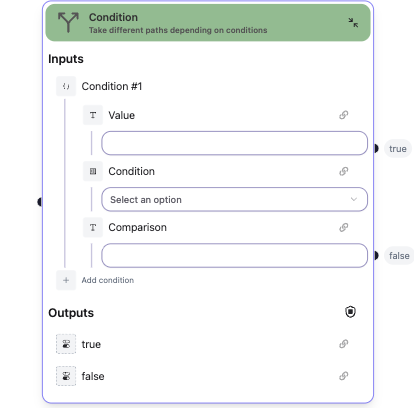
Define one or more conditions to evaluate.Inputs
For each configured condition, the node creates an input with:- Value: The actual value to check
- Condition: The comparison operator (Equals, Not Equals, Contains, etc.)
- Comparison: The value to compare against
- String: Equals, Not Equals, Contains, Not Contains
- Number: Equals, Not Equals, Greater Than, Less Than, Greater or Equal, Less or Equal
- Date: After, Before
- Other types: Equals, Not Equals
Outputs
- true: Output handle when condition(s) are met (boolean)
- false: Output handle when condition(s) are not met (boolean)
Output handles
The node provides two output handles:true- Path taken when conditions evaluate to truefalse- Path taken when conditions evaluate to false