dibby Documentation home page
Search...
⌘K
Support
Dashboard
Dashboard
Search...
Navigation
Nodes
Time Trigger
Documentation
API Reference
Blog
Getting Started
Welcome to dibby
Concepts
Applications
Workflow
Tables
Human Validation
Audit & Logs Overview
On-premise deployment
Organization
Organization management
Nodes
Start
Result
AI Document Extractor
AI Document Classifier
AI Data Processor
Patterns Finder
Action Trigger
Google Sheets Writer
Table Update
Table Read
Condition
Manual Validation
Outlook Trigger
Outlook Add Categories
Outlook Forward Email
Time Trigger
For Each
Combine
Set Run Metadata
On this page
Overview
Configuration
Repeat every
Interval
Outputs
Node type
Usage
Nodes
Time Trigger
Copy page
Start at the specified interval
Copy page
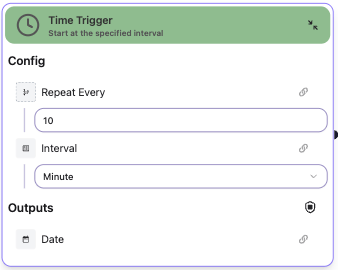
Overview
The
Time Trigger
node automatically starts a workflow at regular time intervals. This is useful for scheduled tasks, periodic data processing, or recurring automation.
Configuration
Repeat every
Specify how often to run the workflow.
Interval
Specify the time unit for repetition.
Outputs
Date
: The current date/time when the trigger fired
Node type
Trigger Node
- This node starts workflow execution automatically on a schedule.
Usage
Configure the interval and frequency. The workflow will run automatically at the specified intervals.
Outlook Forward Email
For Each
⌘I